---
title: "Phau ntawv qhia rau cov kawm"
description: "Nrhiav koj cov chav kawm, kawm tsis muaj internet, thiab kho Quire kom nyeem tau yooj yim."
image: "https://docs.quirelms.com/og.png"
---
> Documentation Index
> Fetch the complete documentation index at: https://docs.quirelms.com/hmn/llms.txt
> Use this file to discover all available pages before exploring further.
# Phau ntawv qhia rau cov kawm
Siv qhov chaw nyob thiab cov ntaub ntawv nkag uas koj lub koom haum muab rau koj. Yog tsis pom ib chav kawm lossis ib yam haujlwm, tiv tauj koj tus xibfwb lossis tus thawj coj kom lawv xyuas koj qhov kev tso npe thiab kev nkag.
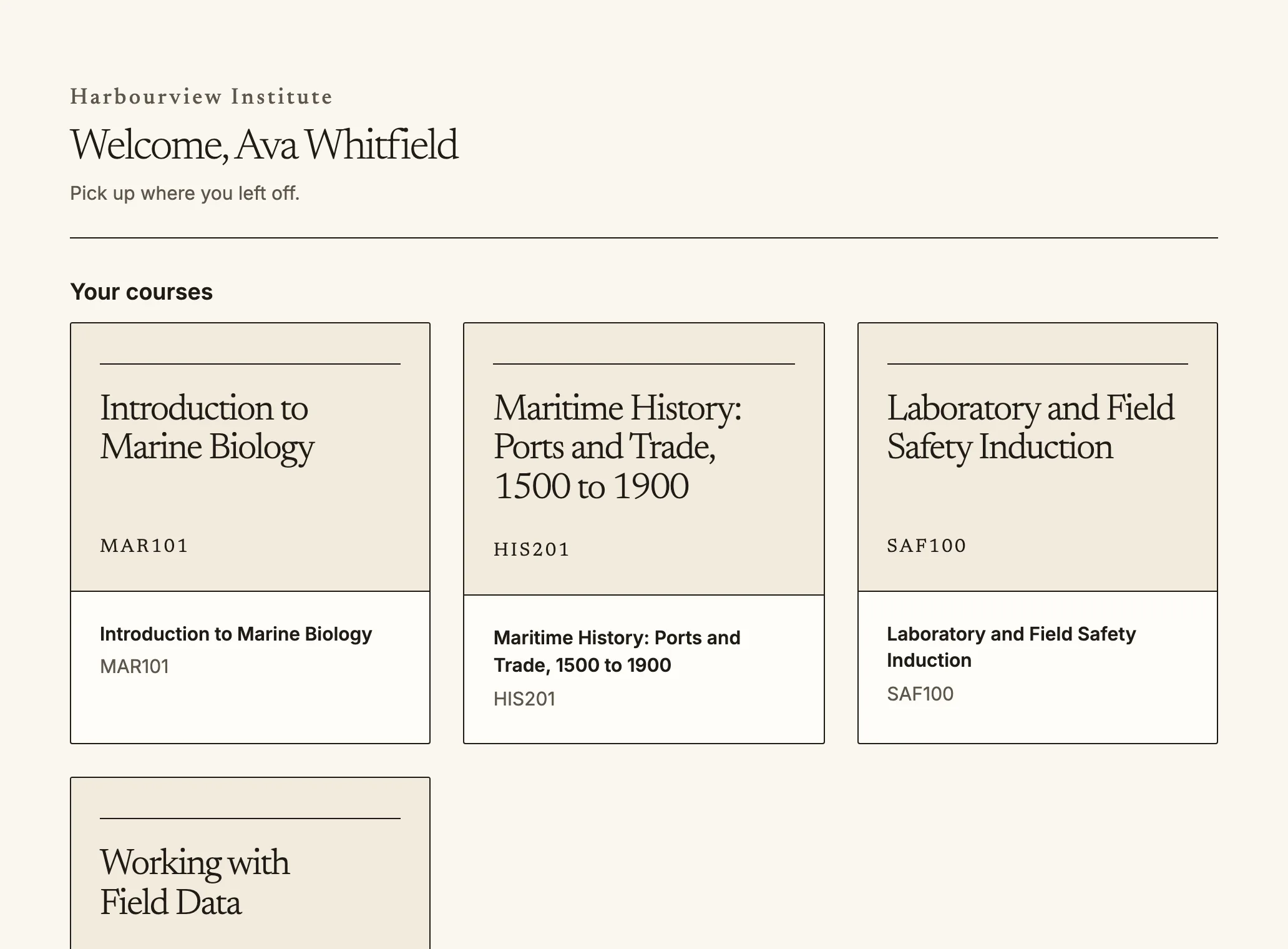 The dashboard lists your courses and where you left off.
Quire yog qhov chaw uas koj cov chav kawm nyob. Nkag mus ntawm qhov chaw nyob
ntawm koj lub koom haum, ces koj lub dashboard (`/dashboard`) qhia yam uas
yuav txog caij ua, yam tshiab thiab qhov chaw uas koj kawm tseg zaum kawg.
## Koj cov chav kawm
The dashboard lists your courses and where you left off.
Quire yog qhov chaw uas koj cov chav kawm nyob. Nkag mus ntawm qhov chaw nyob
ntawm koj lub koom haum, ces koj lub dashboard (`/dashboard`) qhia yam uas
yuav txog caij ua, yam tshiab thiab qhov chaw uas koj kawm tseg zaum kawg.
## Koj cov chav kawm
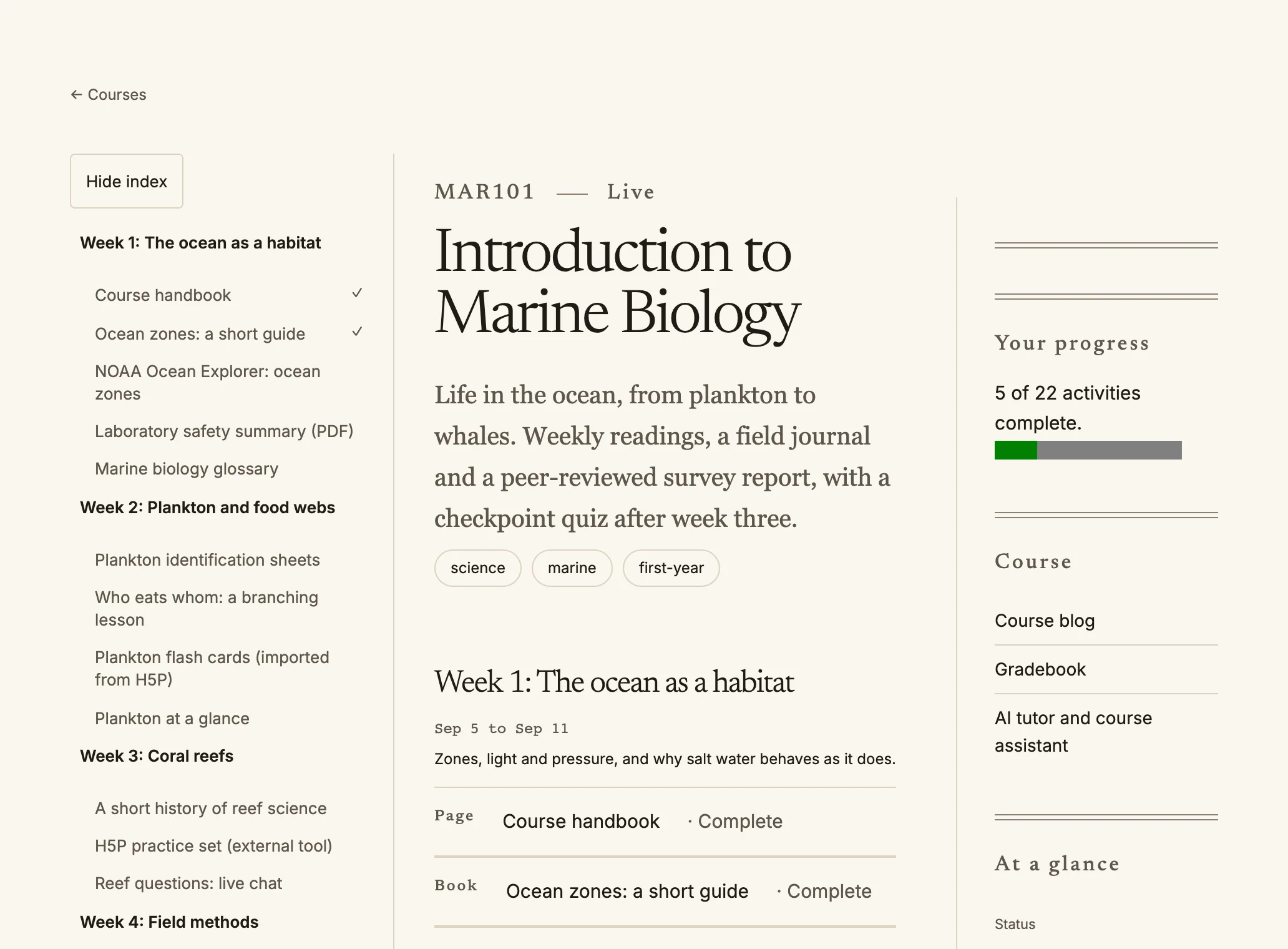 Inside a course: the index on the left, your progress on the right.
- **Kuv cov chav kawm** (`/my/courses`) teev txhua chav kawm uas koj tau tso npe kawm, nrog
koj qhov kev kawm tiav.
- Hauv ib chav kawm, daim ntawv teev tshooj ntawm sab laug (sab xis hauv cov lus nyeem
ntawm sab xis mus rau sab laug) coj koj mus rau txhua ntu. Cov cim zuam qhia yam uas
koj tau ua tiav.
- Ib chav kawm uas lwm lub koom haum tau muab qhia rau koj lub koom haum kuj teev
ntawm no, nrog lo lus **Qhia los ntawm** thiab lub koom haum ntawd lub npe. Koj kawm
chav ntawd ib yam li lwm chav kawm, thiab koj qhov kev sim thiab qhab nia nyob hauv
koj lub koom haum.
- **Cov qhab nia** (`/my/grades`) qhia koj cov qhab nia thiab lus tawm tswv yim thaum
koj tus xibfwb tso tawm lawm.
- **Daim ntawv pov thawj** (`/my/certificates`) thiab **cov cim** (`/my/badges`) khaws
yam uas koj tau txais, nrog ib qhov txuas uas leej twg los siv xyuas tau.
Inside a course: the index on the left, your progress on the right.
- **Kuv cov chav kawm** (`/my/courses`) teev txhua chav kawm uas koj tau tso npe kawm, nrog
koj qhov kev kawm tiav.
- Hauv ib chav kawm, daim ntawv teev tshooj ntawm sab laug (sab xis hauv cov lus nyeem
ntawm sab xis mus rau sab laug) coj koj mus rau txhua ntu. Cov cim zuam qhia yam uas
koj tau ua tiav.
- Ib chav kawm uas lwm lub koom haum tau muab qhia rau koj lub koom haum kuj teev
ntawm no, nrog lo lus **Qhia los ntawm** thiab lub koom haum ntawd lub npe. Koj kawm
chav ntawd ib yam li lwm chav kawm, thiab koj qhov kev sim thiab qhab nia nyob hauv
koj lub koom haum.
- **Cov qhab nia** (`/my/grades`) qhia koj cov qhab nia thiab lus tawm tswv yim thaum
koj tus xibfwb tso tawm lawm.
- **Daim ntawv pov thawj** (`/my/certificates`) thiab **cov cim** (`/my/badges`) khaws
yam uas koj tau txais, nrog ib qhov txuas uas leej twg los siv xyuas tau.
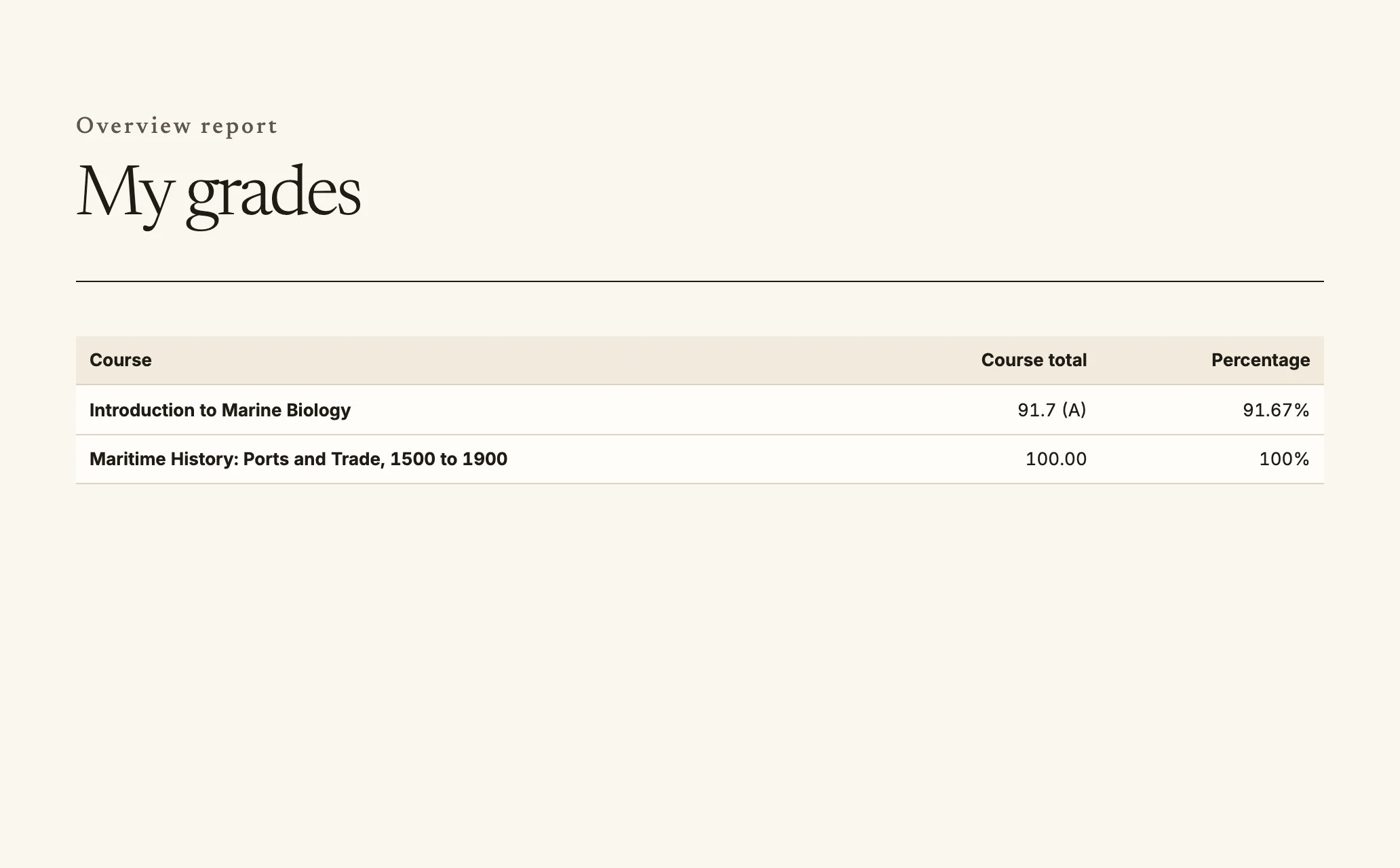 My grades shows one row for each course.
## Tus pab qhia AI
Yog koj lub koom haum muaj tus pab qhia AI, txhua chav kawm uas muaj tus pab qhia ntawd
yuav muaj nplooj **Tus pab qhia AI**. Koj nug txog chav kawm tau thiab txais lus teb
raws li cov ntaub ntawv uas koj qhib tau, nrog lawv cov chaw los. Ua ntej nug thawj zaug,
koj yuav tsum lees txais txoj cai siv AI ntawm koj lub koom haum. Cov lus teb tej zaum
yuav tsis raug, yog li xyuas nrog cov ntaub ntawv hauv chav kawm.
Cov xibfwb uas qhia chav kawm no nyeem tau cov kev sib tham nrog tus pab qhia. Txhua zaus
lawv nyeem, qhov ntawd yuav raug sau tseg thiab koj pom tau: kev sib tham qhia tias ib
tus neeg ua haujlwm tau nyeem, yog leej twg thiab thaum twg; thiab **Daim ntawv teev
kev nkag mus rau tus pab qhia AI** (`/my/ai-privacy`, kuj muaj txuas ntawm koj nplooj
ntawv ntiag tug) teev txhua zaus uas muaj neeg nyeem. Cov kev sib tham khaws cia raws
lub sijhawm uas koj lub koom haum teev tseg ces muab rho tawm; koj kuj rho tau ib qho
kev sib tham tom qab chav kawm xaus.
## Siv thaum tsis muaj internet
Koj rub tau ib chav kawm los kawm thaum tsis muaj kev txuas internet, xws li saum tsheb
ciav hlau lossis lwm qhov chaw uas lub teeb liab tsis muaj zog.
1. Qhib chav kawm thiab xaiv **Rub los kawm offline**. Quire khaws cov nplooj ntawv
thiab ntaub ntawv ntawm chav kawm rau hauv lub cuab yeej no.
2. Kawm li ib txwm. Ib daim paib yuav qhia thaum koj tsis txuas internet.
3. Tej haujlwm uas koj ua thaum offline, xws li zuam cov khoom hauv daim ntawv txheeb,
yuav khaws cia hauv lub cuab yeej thiab xa thaum koj rov txuas internet. `/offline`
teev tej yam tseem tos xa, cia koj rov xa dua, thiab qhia tej yam xa tsis tau nrog
qhov laj thawj, nrog **Sim dua** thiab **Muab pov tseg**.
Kom tso chaw cia, xaiv **Rho tawm ntawm lub cuab yeej no** ntawm `/offline`. Thaum koj
tawm hauv tus as khauj, txhua yam rub cia rau koj lub koom haum hauv lub cuab yeej yuav
raug rho tawm.
Siv xov tooj lossis ntsiav tshuaj, koj kuj **nruab** tau Quire ntawm daim ntawv qhia zaub
mov hauv tus as khauj, kom nws qhib zoo li ib lub app.
My grades shows one row for each course.
## Tus pab qhia AI
Yog koj lub koom haum muaj tus pab qhia AI, txhua chav kawm uas muaj tus pab qhia ntawd
yuav muaj nplooj **Tus pab qhia AI**. Koj nug txog chav kawm tau thiab txais lus teb
raws li cov ntaub ntawv uas koj qhib tau, nrog lawv cov chaw los. Ua ntej nug thawj zaug,
koj yuav tsum lees txais txoj cai siv AI ntawm koj lub koom haum. Cov lus teb tej zaum
yuav tsis raug, yog li xyuas nrog cov ntaub ntawv hauv chav kawm.
Cov xibfwb uas qhia chav kawm no nyeem tau cov kev sib tham nrog tus pab qhia. Txhua zaus
lawv nyeem, qhov ntawd yuav raug sau tseg thiab koj pom tau: kev sib tham qhia tias ib
tus neeg ua haujlwm tau nyeem, yog leej twg thiab thaum twg; thiab **Daim ntawv teev
kev nkag mus rau tus pab qhia AI** (`/my/ai-privacy`, kuj muaj txuas ntawm koj nplooj
ntawv ntiag tug) teev txhua zaus uas muaj neeg nyeem. Cov kev sib tham khaws cia raws
lub sijhawm uas koj lub koom haum teev tseg ces muab rho tawm; koj kuj rho tau ib qho
kev sib tham tom qab chav kawm xaus.
## Siv thaum tsis muaj internet
Koj rub tau ib chav kawm los kawm thaum tsis muaj kev txuas internet, xws li saum tsheb
ciav hlau lossis lwm qhov chaw uas lub teeb liab tsis muaj zog.
1. Qhib chav kawm thiab xaiv **Rub los kawm offline**. Quire khaws cov nplooj ntawv
thiab ntaub ntawv ntawm chav kawm rau hauv lub cuab yeej no.
2. Kawm li ib txwm. Ib daim paib yuav qhia thaum koj tsis txuas internet.
3. Tej haujlwm uas koj ua thaum offline, xws li zuam cov khoom hauv daim ntawv txheeb,
yuav khaws cia hauv lub cuab yeej thiab xa thaum koj rov txuas internet. `/offline`
teev tej yam tseem tos xa, cia koj rov xa dua, thiab qhia tej yam xa tsis tau nrog
qhov laj thawj, nrog **Sim dua** thiab **Muab pov tseg**.
Kom tso chaw cia, xaiv **Rho tawm ntawm lub cuab yeej no** ntawm `/offline`. Thaum koj
tawm hauv tus as khauj, txhua yam rub cia rau koj lub koom haum hauv lub cuab yeej yuav
raug rho tawm.
Siv xov tooj lossis ntsiav tshuaj, koj kuj **nruab** tau Quire ntawm daim ntawv qhia zaub
mov hauv tus as khauj, kom nws qhib zoo li ib lub app.
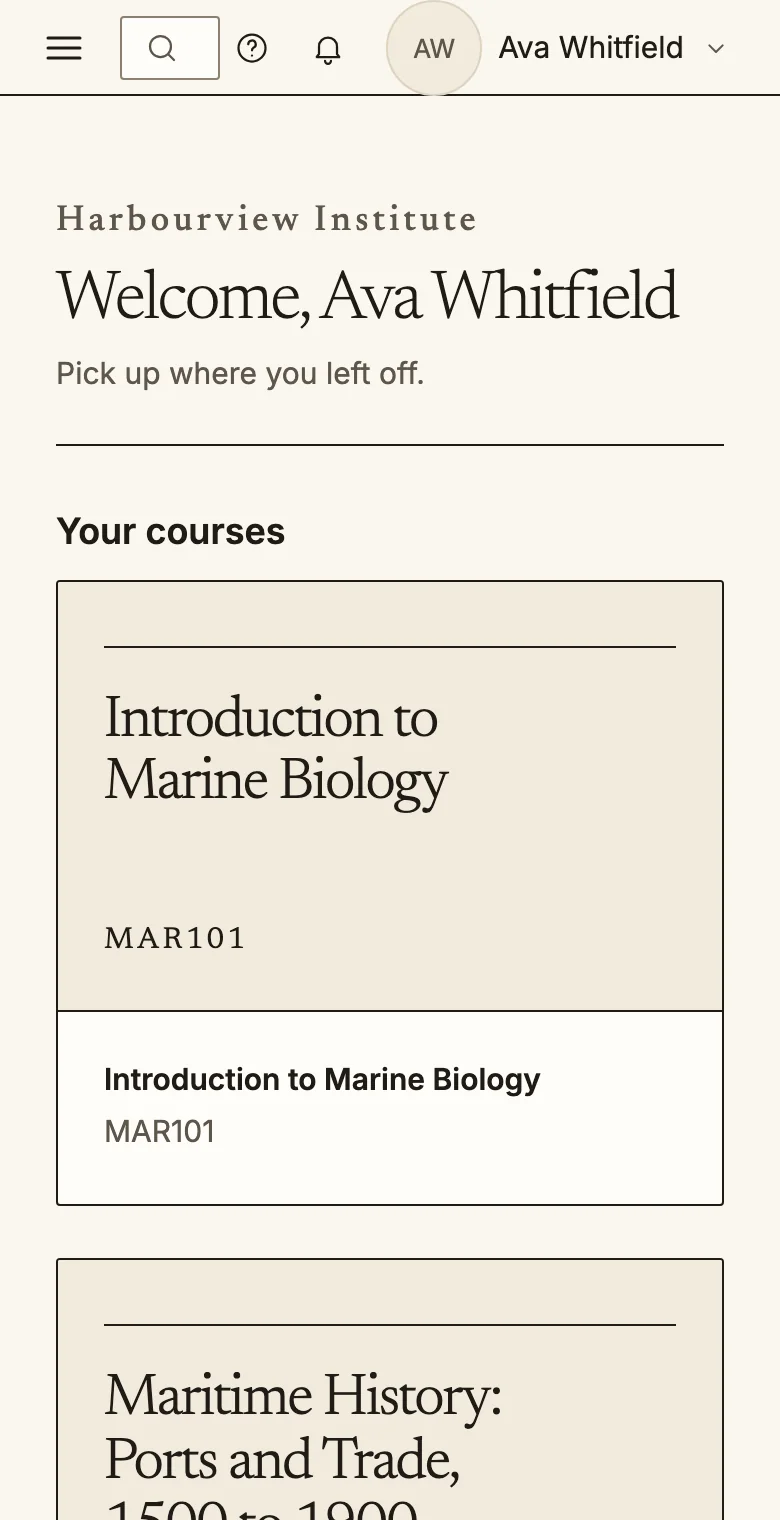
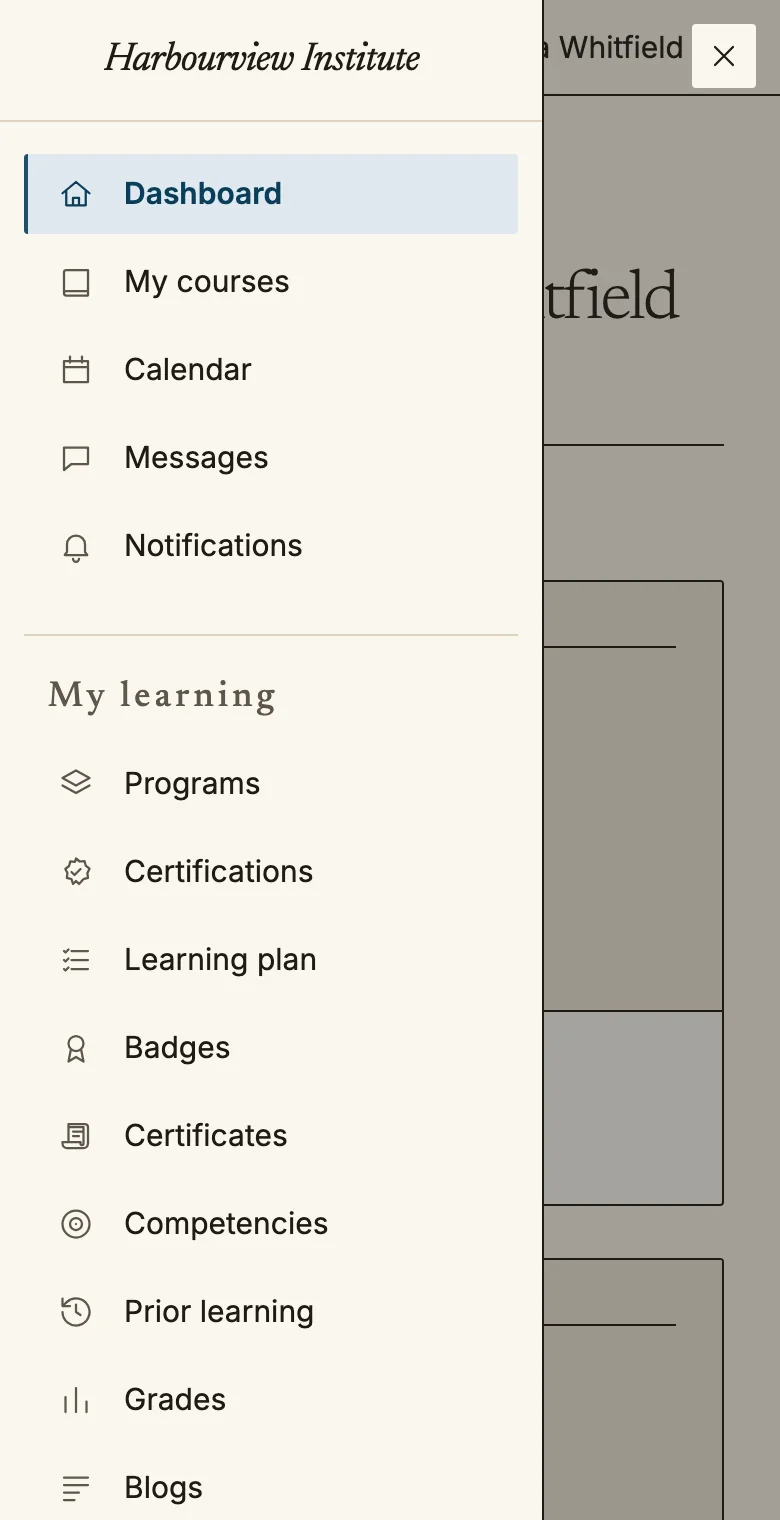 On a phone the navigation opens from the menu button at the top left.
## Kho Quire kom haum
Qhib **Kev nyiam** ntawm daim ntawv qhia zaub mov hauv tus as khauj (`/account/preferences`).
On a phone the navigation opens from the menu button at the top left.
## Kho Quire kom haum
Qhib **Kev nyiam** ntawm daim ntawv qhia zaub mov hauv tus as khauj (`/account/preferences`).
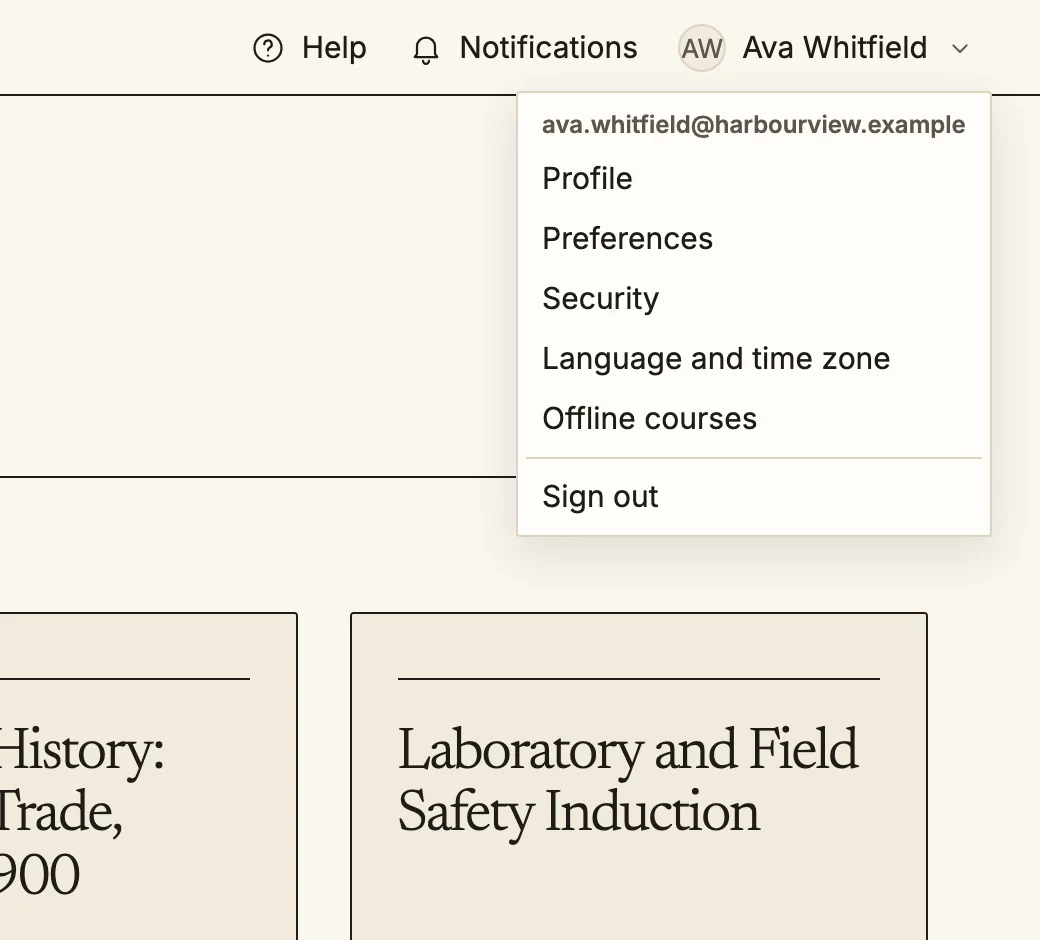 The account menu is at the top right of every page.
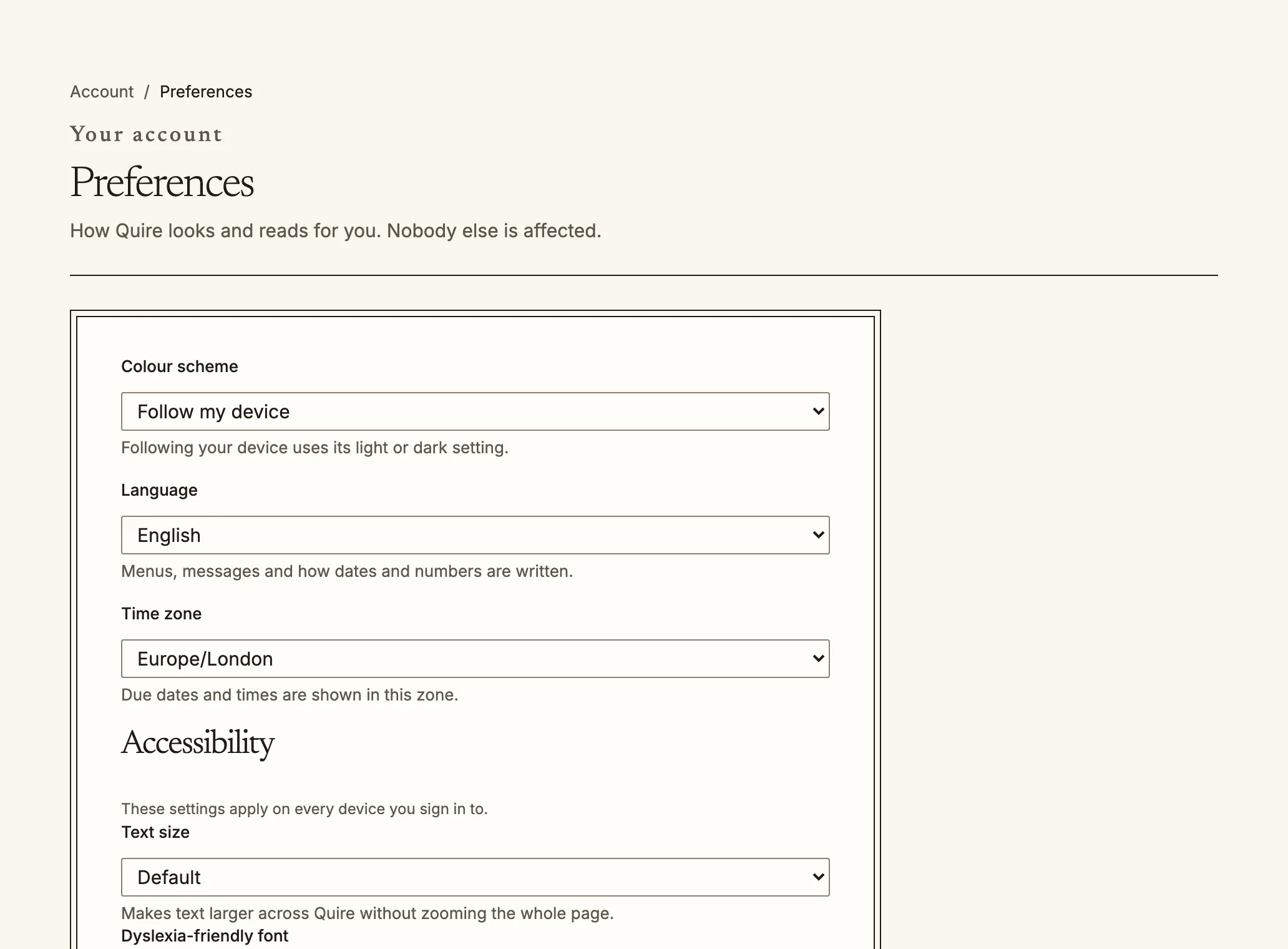 Preferences: colour scheme, language, time zone and accessibility.
- **Lus**: xaiv ntawm ntau tshaj ib puas hom lus. Muaj nees nkaum hom uas txhais tag nrho;
lwm hom txhais cov ntawv qhia zaub mov thiab cov nplooj tseem ceeb xwb, lwm qhov yuav
qhia ua lus Askiv. Cov lus uas cim tias **txhais tshuab** yog txhais cia li; tej zaum
cov lus yuav tsis zoo tag.
Arabic, Hebrew, Persian thiab Urdu nyeem ntawm sab xis mus rau sab laug.
- **Qhov loj ntawm ntawv**: Ib txwm, Loj, Loj dua lossis Loj tshaj (txog ib thiab ib nrab
npaug ntawm qhov loj ib txwm), thoob Quire yam tsis tas nthuav nplooj ntawv.
- **Hom ntawv yooj yim rau dyslexia**: siv hom tsiaj ntawv uas cov tsiaj ntawv sib txawv
meej thiab muaj qhov nrug dav dua.
- **Txo kev txav**: hloov cov duab txav mus ua kev ploj tshwm zuj zus, txawm koj lub
cuab yeej teeb li cas los xij.
- **Qhov sib txawv siab**: ua kom ntawv, ciam teb thiab kab qhia qhov chaw tsom pom meej dua.
- **Xim**: kaj, tsaus, lossis raws koj lub cuab yeej.
- **Lub sijhawm cheeb tsam**: qhia hnub thiab sijhawm kawg raws lub sijhawm cheeb tsam no.
Cov kev xaiv no nrog koj mus rau txhua lub cuab yeej uas koj nkag siv.
## Keyboard thiab cov nyeem nplooj
Txhua nplooj pib muaj qhov txuas **Hla mus rau cov ntsiab lus tseem ceeb**, thiab cov
cheeb tsam tseem ceeb muaj cim npe (kev taw qhia, cov ntsiab lus tseem ceeb, ntawv ceeb
toom) kom tus nyeem nplooj dhia tau ntawm ib qho mus rau lwm qhov. Txhua yam uas koj ua
tau siv nas los kuj ua tau siv keyboard; nias `Tab` los txav thiab `Enter` los xaiv.
## Txuas mus rau phau txhais lus
Yog chav kawm muaj phau txhais lus, ib lo lus uas phau ntawd txhais yuav ua ib qhov txuas
thaum twg cov ntawv hauv chav kawm hais txog nws, xws li hauv zaj kawm, lus sib tham hauv
kev sib tham, lus nug xeem thiab cov ntsiab lus luv. Xaiv qhov txuas mus saib lub ntsiab lus.
## Koj cov ntaub ntawv
Preferences: colour scheme, language, time zone and accessibility.
- **Lus**: xaiv ntawm ntau tshaj ib puas hom lus. Muaj nees nkaum hom uas txhais tag nrho;
lwm hom txhais cov ntawv qhia zaub mov thiab cov nplooj tseem ceeb xwb, lwm qhov yuav
qhia ua lus Askiv. Cov lus uas cim tias **txhais tshuab** yog txhais cia li; tej zaum
cov lus yuav tsis zoo tag.
Arabic, Hebrew, Persian thiab Urdu nyeem ntawm sab xis mus rau sab laug.
- **Qhov loj ntawm ntawv**: Ib txwm, Loj, Loj dua lossis Loj tshaj (txog ib thiab ib nrab
npaug ntawm qhov loj ib txwm), thoob Quire yam tsis tas nthuav nplooj ntawv.
- **Hom ntawv yooj yim rau dyslexia**: siv hom tsiaj ntawv uas cov tsiaj ntawv sib txawv
meej thiab muaj qhov nrug dav dua.
- **Txo kev txav**: hloov cov duab txav mus ua kev ploj tshwm zuj zus, txawm koj lub
cuab yeej teeb li cas los xij.
- **Qhov sib txawv siab**: ua kom ntawv, ciam teb thiab kab qhia qhov chaw tsom pom meej dua.
- **Xim**: kaj, tsaus, lossis raws koj lub cuab yeej.
- **Lub sijhawm cheeb tsam**: qhia hnub thiab sijhawm kawg raws lub sijhawm cheeb tsam no.
Cov kev xaiv no nrog koj mus rau txhua lub cuab yeej uas koj nkag siv.
## Keyboard thiab cov nyeem nplooj
Txhua nplooj pib muaj qhov txuas **Hla mus rau cov ntsiab lus tseem ceeb**, thiab cov
cheeb tsam tseem ceeb muaj cim npe (kev taw qhia, cov ntsiab lus tseem ceeb, ntawv ceeb
toom) kom tus nyeem nplooj dhia tau ntawm ib qho mus rau lwm qhov. Txhua yam uas koj ua
tau siv nas los kuj ua tau siv keyboard; nias `Tab` los txav thiab `Enter` los xaiv.
## Txuas mus rau phau txhais lus
Yog chav kawm muaj phau txhais lus, ib lo lus uas phau ntawd txhais yuav ua ib qhov txuas
thaum twg cov ntawv hauv chav kawm hais txog nws, xws li hauv zaj kawm, lus sib tham hauv
kev sib tham, lus nug xeem thiab cov ntsiab lus luv. Xaiv qhov txuas mus saib lub ntsiab lus.
## Koj cov ntaub ntawv
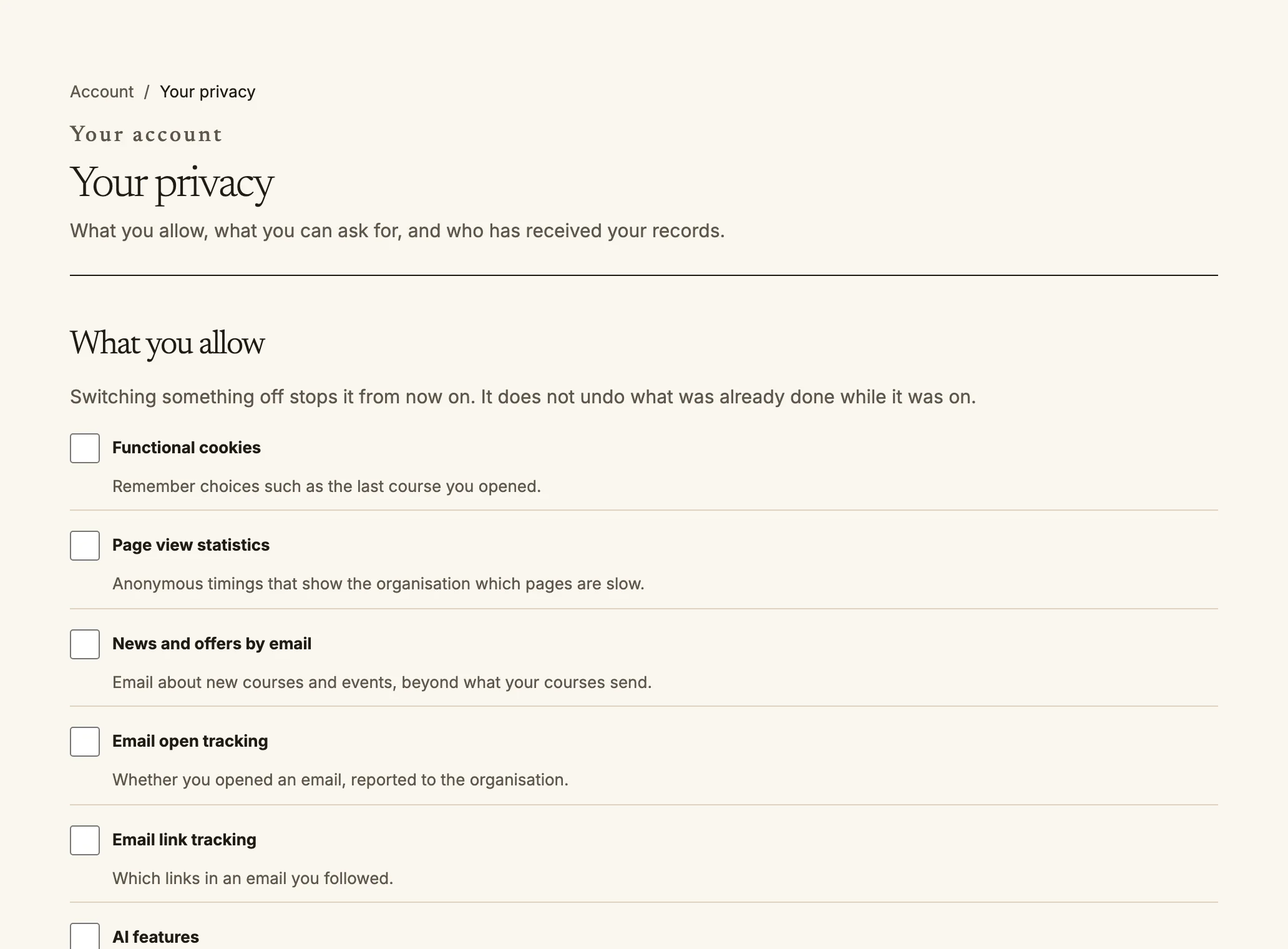 Your privacy: choose what you allow, and ask about your data.
Koj lub koom haum txiav txim tias Quire khaws ntaub ntawv dab tsi txog koj thiab khaws
ntev npaum li cas; txoj cai ntiag tug ntawm lub koom haum muaj txuas rau hauv qab txhua
nplooj. Koj kuj tswj tau koj cov ntaub ntawv ntawm `/account/privacy`:
- **Yam uas koj tso cai**: tua tej hom laj thawj xws li txheeb cais siv, tshaj tawm thiab
yam ntxwv AI. Thaum tua ib yam lawm, nws yuav nres txij ntawd mus, tiam sis tsis thim
yam uas twb ua thaum nws tseem qhib. Tus kawm uas tseem yau dua hnub nyoog tso cai siv
muaj cov no kaw kom txog thaum tus saib xyuas pom zoo.
- **Nkaum kuv ntawm daim ntawv teev npe**: cov neeg uas tsis qhia lossis tswj koj yuav tsis
pom koj lub npe thiab profile hauv cov npe neeg thiab kev tshawb nrhiav.
- **Nug txog kuv cov ntaub ntawv**: thov ib daim qauv ntawm koj cov ntaub ntawv, ib daim
qauv nqa mus siv tau, kom kho cov ntaub ntawv, lossis rho koj tus as khauj. Quire xa
email muaj qhov txuas kom koj lees paub qhov kev thov; tsis muaj dab tsi tshwm sim txog
thaum koj qhib qhov txuas ntawd. Tus saib xyuas kev ntiag tug ntawm koj lub koom haum
ua qhov kev thov, thiab nplooj ntawv teev txhua qhov kev thov nrog nws qhov xwm txheej
thiab hnub kawg. Kev rho tawm yuav tos 24 teev tom qab koj lees paub, thiab koj thim tau
ua ntej lub sijhawm ntawd xaus. Cov ntaub ntawv uas lub koom haum yuav tsum khaws, xws
li qhab nia thiab daim ntawv pov thawj, tseem nyob tiam sis yuav tsis qhia tias yog koj.
- **Leej twg tau txais kuv cov ntaub ntawv**: txhua zaus uas koj cov ntaub ntawv kawm raug
muab rau ib tug neeg sab nraum lub koom haum, thiab vim li cas.
- **Kev sib tham nrog tus pab qhia AI**: leej twg tau nyeem lawv; siv qhov txuas ntawm tib
nplooj ntawv.
Source: https://docs.quirelms.com/hmn/learner/index.mdx
Your privacy: choose what you allow, and ask about your data.
Koj lub koom haum txiav txim tias Quire khaws ntaub ntawv dab tsi txog koj thiab khaws
ntev npaum li cas; txoj cai ntiag tug ntawm lub koom haum muaj txuas rau hauv qab txhua
nplooj. Koj kuj tswj tau koj cov ntaub ntawv ntawm `/account/privacy`:
- **Yam uas koj tso cai**: tua tej hom laj thawj xws li txheeb cais siv, tshaj tawm thiab
yam ntxwv AI. Thaum tua ib yam lawm, nws yuav nres txij ntawd mus, tiam sis tsis thim
yam uas twb ua thaum nws tseem qhib. Tus kawm uas tseem yau dua hnub nyoog tso cai siv
muaj cov no kaw kom txog thaum tus saib xyuas pom zoo.
- **Nkaum kuv ntawm daim ntawv teev npe**: cov neeg uas tsis qhia lossis tswj koj yuav tsis
pom koj lub npe thiab profile hauv cov npe neeg thiab kev tshawb nrhiav.
- **Nug txog kuv cov ntaub ntawv**: thov ib daim qauv ntawm koj cov ntaub ntawv, ib daim
qauv nqa mus siv tau, kom kho cov ntaub ntawv, lossis rho koj tus as khauj. Quire xa
email muaj qhov txuas kom koj lees paub qhov kev thov; tsis muaj dab tsi tshwm sim txog
thaum koj qhib qhov txuas ntawd. Tus saib xyuas kev ntiag tug ntawm koj lub koom haum
ua qhov kev thov, thiab nplooj ntawv teev txhua qhov kev thov nrog nws qhov xwm txheej
thiab hnub kawg. Kev rho tawm yuav tos 24 teev tom qab koj lees paub, thiab koj thim tau
ua ntej lub sijhawm ntawd xaus. Cov ntaub ntawv uas lub koom haum yuav tsum khaws, xws
li qhab nia thiab daim ntawv pov thawj, tseem nyob tiam sis yuav tsis qhia tias yog koj.
- **Leej twg tau txais kuv cov ntaub ntawv**: txhua zaus uas koj cov ntaub ntawv kawm raug
muab rau ib tug neeg sab nraum lub koom haum, thiab vim li cas.
- **Kev sib tham nrog tus pab qhia AI**: leej twg tau nyeem lawv; siv qhov txuas ntawm tib
nplooj ntawv.
Source: https://docs.quirelms.com/hmn/learner/index.mdx